

Talking to Claude Code
How I enabled full voice communication with a fully unmodified Claude Code CLI using locally hosted AI.
- Claude Code has Speech To Text (STT), if you run it directly from a terminal and not from tmux, like I do, but it completely lacks text-to-speech (TTS).
- If you want to use Anthropic’s subscription model and not pay per token, then you have to use their official harness and not a third-party harness.
- I used Claude Code to build an intelligent vocal harness around Claude Code, so that I could talk to it and it could talk to me back.
- If you want to build one too, tailored to your own setup, there’s a massive prompt at the end of this article that you can copy and feed to your AI of choice.
So why even do this? I’ve been experimenting with different ways to interact with AI and harnesses, and I felt like one of the things I really couldn’t do very well right now was speak naturally. I felt like talking might help improve throughput and stream of consciousness feedback to the sessions.
Why I didn’t just use what’s built in
I generally don’t like reinventing the wheel for nothing, so I checked what options I currently had. Nothing quite fit.
- Claude Code’s speech-to-text: You can talk to Claude Code in a terminal (but not in tmux). It can’t talk back to you though.
- Third-party harnesses: There are other options available, but if you use a third-party harness, you have to pay Anthropic’s API token usage rates and not use their subscription model which is substantially cheaper. So I’m stuck with Claude Code.
- Is just audio enough? I wanted more than dictation and a screen reader. I wanted something that would intelligently infer what I need and manage multiple Claude sessions simultaneously. I wanted it to summarize the long messages from Claude Code. I wanted to be able to ask to repeat something or elaborate. And I wanted to do this without using more Anthropic tokens.
So, what is this project?
Voiced is my attempt at making an intelligent, local LLM layer that could interpret my needs and commands, and feed my voice to Claude, then summarize Claude’s responses in a more colloquial way.
Note that the below architecture is just what I implemented and used. The resources needed for these models are modest — about 47 GB of VRAM/unified memory with the current models listed, or around 10 GB with a smaller 9B moderator — and it does not require something like a Mac Studio M3 Ultra with 256 GB of unified memory.
Simply put, my laptop captures the audio, conditions it, and sends it off to the M3 to do the speech-to-text. That text is then routed back to the laptop’s router (described in detail below) to decide what to do with it. It either handles the request locally with an LLM I called the moderator, which is also running back on the M3, or it hands it off to Claude Code. When Claude Code replies, that reply then goes off to the moderator on the M3 again for it to decide how to summarize, and then that is passed back over to another service on the M3 (Kokoro) that runs the text-to-speech model, and all that is played back out to the laptop.
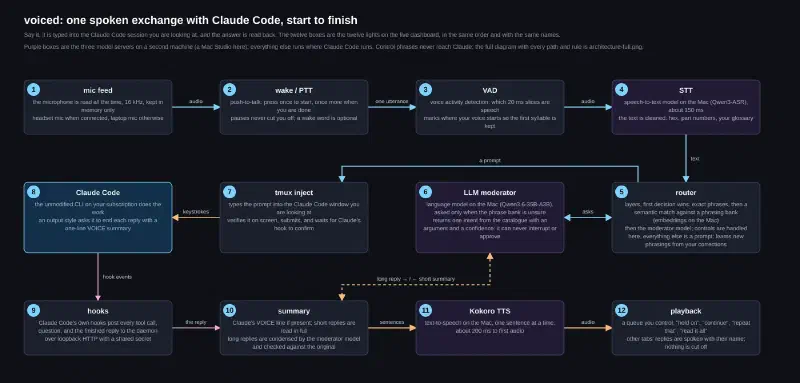
Here’s what each box does, in order:
- Mic feed: The mic comes from my laptop, or a Bluetooth headset.
- Wake / PTT: I did build in the ability for it to run off of a wake word, but I prefer the push to talk, so that I don’t have to worry about long pauses while I think and it cutting me off before I’m done. I’ve tied a special hotkey on the laptop for the push-to-talk, and I’ve also wired an action button on my headphones to trigger it easily.
- VAD: Voice activity detection removes dead space and ensures that we only need to process audio with valid speech.
- STT: The speech-to-text engine that turns the audio into text. This one is running on the M3, and I found that the Qwen3-ASR works very reliably and very quickly.
- Router: I’ll go into detail below about the router, but simply put, there are several layers of decision points, with the simplest and fastest acting first, and ending on a more robust interpretation of intent by an LLM. All of this is still rather quick, regardless of what path it takes.
- LLM moderator: This one is running on the M3 again, and it’s using the Qwen3.6-35B-A3B model. It appears to be an excellent balance of intelligence and speed in responding, taking a median of 805 milliseconds.
- tmux inject: The reason why I use and like tmux is because it allows me to run multiple Claude sessions and attach to that workspace remotely very easily. I can jump back and forth between different computers or my phone as needed. It also allows us to enter keystrokes into the terminal programmatically, which was key in using Anthropic’s Claude Code CLI without any modification to their harness.
- Claude Code: Anthropic’s agentic harness. This is what I would normally be typing in and getting information back out of without Voiced.
- Hooks: Basically, the ways that we see status from Claude Code, such as tool calls, or when we know that it’s done thinking.
- Summary: I created a skill in Claude so that if I told it I was working in a voice mode, that it would give me a summary at the end, tagged in a certain way, that would make it easier for my program to grab and summarize. However, as I improved the router, it turns out that I actually don’t need that feature at all. And while it’s still implemented, I hardly use it.
- Kokoro TTS: This is the text-to-speech client. We give it text, and it outputs the audio that we would hear. I chose this server as the voice generation for a couple of reasons. The first is that it’s very fast, and the audio quality of some of the voices is reasonable enough to use. I’ve played with other services that allow you to clone voices, and these sound a lot more natural. But the cloned voice models tend to add hallucinations and artifacts. They also don’t really say exactly what you put into them, or at least that was the case in testing. They also tend to be a lot slower.
- Playback: This is just playing the audio through the laptop speakers or my headset.
The router
The first version of the router was based entirely off of regexes, trying to match exact phrases to actions. As you can imagine, slight shifts in the request made the router miss the mark. Asking the router to repeat the last message it just said often resulted in it sending the request to repeat to Claude Code, which isn’t helpful.
The current version uses a tiered system that goes from rigid but fast, to flexible but slow (if you want to call 0.8 seconds slow). I also restricted actions like interrupting Claude, or approving a permission or prompt to the exact layer to prevent vague interpretations of requests resulting in an action I didn’t want it to take for me.
Basic controls, “stop,” “repeat that,” “switch to grants”, etc. Acts pretty much instantly. The only layer allowed to do the most impactful operations like interrupting Claude, approving a permission, or discarding a prompt.
Sends long, obviously-a-prompt sentences straight to Claude with no model call at all.
The semantic search compares against a bank of variations of key phrases. A phrase is entered, and similarities to existing phrases are scored, and if it’s close enough to a known command phrase, it acts on it. It’s operated on an embedding model (BGE-M3, specifically bge-m3-mlx-fp16), also running on the M3. This stage is very quick, at about 40 ms.
Failing the previous steps, it’s left to a more intelligent but slower thinking LLM to interpret intent. We are using Qwen3.6-35B-A3B. We still get sub-second responses using this model and the accuracy has been very good. The responses are also constrained to a structure that ensures compliance.
It also has a learning component where if something was misinterpreted, I can say so. It will then go into a mode where it asks me what the right intent was, verifies it with me, and then saves it for later. It can only do this for standard commands, not the high-impact actions like interrupting Claude or approving a permission.
The fun of making it build itself
It’s always fun designing a harness and using the harness to iterate and improve itself. As soon as I could talk to it, each time I ran into a frustration I would voice it (pun intended) and it would have an updated version for me in about a minute.
There’s something satisfying about having a natural conversation with something and asking it to add features and self-improving things.
It reminded me of when I built my own custom agentic harness from scratch where all I had was a chat LLM endpoint and Python. Every iteration made it better at iterating itself. It’s a fun challenge.
The dashboard
The debugging that I added was key to working out early issues with the system. The events show every action and can be expanded to show the full detail like the command that was received, the voice interpretation, and the spoken responses, as well as all the hooks for the tool calls. The same information can be seen in the debug filterable window instead of the chronological quick view of the events section.
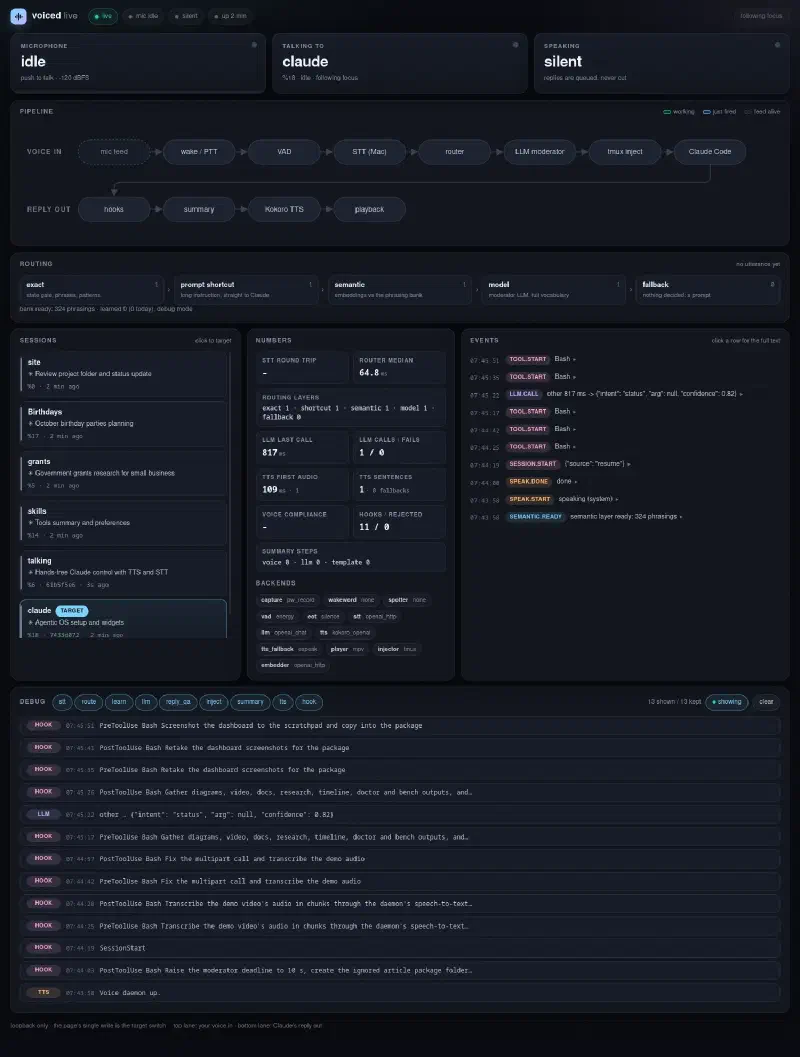
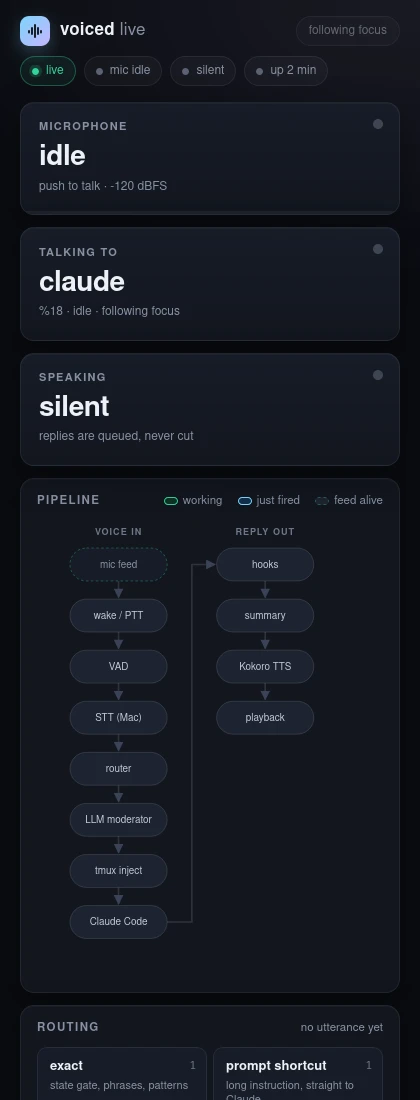
A nice surprise was the web dashboard reflows to phone widths too!
A look at performance
On a warm start (the LLMs have already been loaded into VRAM on the M3 because a call was already made or they were pinned in the server), I get the following on average:
- 150 ms speech-to-text round trip
- Router
- 1 ms for exact matches
- 40 ms for the semantic layer
- <1 s for the moderator’s reply
- 200 ms audio generation
The use seems very stable at this point, and several bugs appear fixed — like reading out temperatures such as 19.7°C/67°F as “nineteen point seven C slash sixty-seven F,” which now works.
Build your own
This whole setup is very specific to my use case, and my hardware topology. While I could release the code for this, I think it makes more sense for you to prompt your own agentic harness to work with you and your setup to build your own.
To be clear, I had my own agent that I built this with, write up a prompt to reproduce the work it did. It’s a MASSIVE prompt. But if you wish, you can feed it to your LLM of choice and ask it to scan it, verify its safety, and use it to help you build your own version.
I want hands-free voice control of my Claude Code sessions: I talk, it types my words into the Claude Code session running in tmux, and it reads Claude's answer back in a natural voice. Commands like "hold on", "repeat that", "read it all", "cancel claude", and "switch to <tab>" are handled by the daemon and never reach Claude. Claude Code stays the plain interactive CLI on my subscription: no API billing, no third-party harness, no `claude -p`, no patched binary. Speech recognition, the small helper model, and the voice run on hardware I own.

Build it as a Python daemon called `voiced`. The design below is what I landed on after building and red-teaming it once — treat it as a strong starting point, not a straitjacket. If something doesn't fit my hardware or my preferences, say so and we'll adjust it together. Where the design names a backend, make it a class behind a small interface so it can be swapped by config.

## How I want you to work

- Interview me first, then confirm the plan before you build. Walk Phase 0 with me and write no daemon code until I've signed off on the design and on where the inference runs.
- Ask one question at a time, and only when the answer changes what you do next. Measure what you can rather than asking me for numbers you could find yourself.
- Move through the phases below. End each with a short report (under ~200 words) of what you ran and found, and stop for my approval before installing packages or touching anything outside the project directory and `~/.config/voiced/`.
- If something on my system doesn't fit the design, tell me and suggest which backend to swap — don't silently work around it. If a service won't start, show the last 20 log lines and your single best next step.

## What the finished thing does

A daemon on the Claude machine reads the microphone all the time but only acts when a push-to-talk key opens the gate. The recording goes to a speech-to-text server, the text is cleaned up, and a router decides whether it was a control phrase, a question the daemon can answer itself, or a prompt for Claude. Prompts are typed into the tmux pane I am looking at, with verification and an acknowledgment. Claude Code hooks feed the daemon everything that happens during the turn. When the turn ends, the daemon speaks a short summary, or reads short replies in full, through a text-to-speech server, one sentence at a time with pause, resume, and repeat. A local web page shows every stage lighting up. Everything runs on the LAN; only 16 kHz audio and short text ever leave the Claude machine.

## Phase 0: agree on the design and where inference runs

Start by telling me back, in your own words, what you're about to build and how the pieces fit — so I can catch anything I don't want before any code is written. Then interview me on the choices that actually change the build:

- Where should each inference service run? There are three — speech-to-text, an embedding model, and an optional moderator LLM — and each can live on the Claude machine or on another box on my LAN. Ask what hardware I have and where I'd like each to run, then recommend a placement with the trade-offs (latency, quality, privacy, setup effort, cost). Call out plainly if any option would send my audio or Claude's replies off my network.
- How do I want to trigger it — push-to-talk (press to start, press to stop, which suits me if I pause mid-thought), a wake word, or both?
- What's my privacy tolerance, so you know whether hosted endpoints are even on the table?

Confirm my answers, then hold for Phase 1 before proposing anything concrete.

## The design

### Safety rules to keep (these came out of a ten-reviewer red-team pass; please preserve them)

- Claude Code must run inside a tmux server on the machine running the daemon. The daemon types through that tmux socket and captures from that machine's microphone. Attaching to the tmux from another device over SSH is fine.
- The daemon never types into a dialog. Permission prompts are announced and answered on the keyboard by default.
- "stop" only stops playback. Interrupting Claude is a separate phrase, sends at most one Escape per turn with a lockout and a post-check, and never Ctrl+C. Reason: Escape on a permission prompt declines it, and double Escape on an empty input opens Claude's rewind menu.
- Every keystroke traces to a human utterance from the last 30 seconds: no retried text, no scheduled prompts, no LLM-composed prompts. The helper model may label an utterance but can never emit a keystroke, an interrupt, or an approval.
- The control plane is loopback-only with a shared secret. Audio stays in RAM. Secrets live in files with mode 0600, never in the config.
- Claude Code's `Stop` hook does not fire when a turn is interrupted, so session state must also recover from `UserPromptSubmit`, `SessionStart`, and a periodic tmux scan.

### Module 1: capture

Read the microphone continuously with PipeWire's `pw-record --raw --rate 16000 --channels 1 --format s16 --latency 20ms --target <node>` in a subprocess, 20 ms blocks into a bounded queue. The config's `audio.source` is a list of PipeWire node names or glob patterns in preference order (for example a Bluetooth headset first, the laptop mic second); the first one present wins, and a maintenance loop re-checks every 5 seconds and restarts capture on the better source, but only while the mic gate is closed. Never use "default", never use a monitor node. Bluetooth microphones are allowed only when `audio.allow_bluetooth_capture = true`; capturing from one switches the headset to its headset profile, so say so in the doctor output. Alternate backends: `arecord` and `sounddevice`. If capture dies, restart it every 5 seconds.

### Module 2: activation (the mic gate)

Push-to-talk is driven by `voicectl talk start|stop|toggle` over a unix control socket. Two modes, selected by `activation.ptt_toggle_one_shot`: with it false, a toggle press opens the gate and the next press closes it and sends everything in between as one utterance, no silence detection at all (best for people who pause mid-thought); with it true, one press opens the gate for one utterance that ends on silence, and closes after 10 seconds if nothing was said. Keep a 400 ms pre-roll ring of audio from before speech onset and prepend it to every utterance so the first syllable is never lost. In one-shot mode, hold back an utterance shorter than 900 ms of speech and merge it with whatever follows within 2.5 seconds, so "Oh." followed by the real sentence arrives as one. A wake-word backend (openWakeWord) is optional and opens an 8-second window. A key press or a wake word cuts playback.

### Module 3: voice activity and end of turn

Voice activity detection (VAD) is per 20 ms block. Default: energy in dBFS against an adaptive noise floor, 200 ms hangover. Optional: Silero. End of turn is a separate small class: 800 ms of VAD silence after speech (350 ms cut people off mid-sentence), 20 s hard cap. It applies only in one-shot and wake-word modes.

### Module 4: speech-to-text

Post the utterance as a WAV to an OpenAI-compatible `/v1/audio/transcriptions` endpoint over HTTP, with a keep-alive client and a 4 s timeout, sending a short glossary of my technical terms as the prompt. Then gate the transcript: drop recordings under 400 ms, transcripts matching known silence hallucinations ("thank you for watching", "subtitles by", a lone "you", "um"), empty ones, and confidence under 0.3. Then normalise: "I squared C" to I2C, "hex three F" to 0x3F, spoken digits to numbers, "three point three" to 3.3, and glossary spellings. Alternate backend: local sherpa-onnx.

### Module 5: router (layers, first decision wins)

Build one intent catalogue first: name, kind (control, target, status question, reply question, prompt, learn), argument shape, consequence class (benign or high), and which layers may decide it. The grammar phrases, the phrasing bank, the moderator's JSON schema, the state gate, and the dashboard labels are all generated from it. High-consequence intents (interrupt, approve, deny, discard, option, yes) are exact-layer only and are not even in the moderator's schema.

The router gets the text plus a state line: playing, paused, Claude busy, dialog open, last turn ended in a question, a prompt awaiting confirmation, a reply exists, a forwarded question is pending, and the list of open session names. Every decision records the layer, confidence, semantic candidates, and latency.

- Layer 0, exact: the state gate (while audio plays "stop" means playback; while a dialog is open nothing is typed; while asleep only "wake up" gets through) plus a fuzzy grammar of bare phrases of up to three words (ratio 0.78, synonyms in config; an utterance that exactly equals a phrase of a currently illegal control must never fuzz into another control), plus regex patterns: "ask claude …" forces a prompt with the original wording, "tell me …" forces a local answer from the reply, "after this …" holds a prompt until the turn ends, "no, I meant …" starts a correction, a control word followed by more words is a prompt. A "switch to <name>" hit counts only if the name resolves to a known session or a number.
- Prompt shortcut: a declarative of six or more words that is not a request or question and does not refer back to the reply ("it", "that", "the answer") goes straight to Claude with no model call.
- Layer 1, semantic: embed the utterance (OpenAI-compatible `/v1/embeddings`; BGE-M3 on oMLX, about 40 ms) and compare by cosine with a phrasing bank: one text file per intent with at least eight phrasings, plus the user's learned file. Lines with a `<name>` slot are regex patterns that capture the session argument. Accept the best intent at similarity 0.78 or above (0.90 for six words or more, because long sentences are usually prompts) when the runner-up intent is at least 0.03 behind. Cache the bank's embeddings on disk keyed by bank contents and model. Below the thresholds, pass the top three candidates to Layer 2 as hints.
- Layer 2, model: the moderator LLM gets a compact system prompt listing every intent with a one-line meaning (keep it around 2,000 characters; prefill dominates latency), the state line, a 500-character excerpt of the last reply, the semantic hints, and the utterance, and returns `{intent, arg, confidence}` under a JSON schema. Deadline 1,500 ms; on timeout, error, or confidence under 0.5 the utterance is a prompt. Rule in the prompt: anything about code, files, a database, or a project is a prompt even if it contains words like stop, read, list, or switch.
- Fallback: prompt.

Ship a golden set of at least 150 real and paraphrased utterances with their intended intent, and a `diag router-bench` command that runs it through Layer 1 alone (accuracy and a threshold sweep) and through the full router per candidate model (accuracy, median and p95 latency, confusions, and a count of high-consequence intents executed from a model, which must be zero). Reference numbers: Layer 1 111 of 112 control phrasings correct at 36 ms median; full router 143 of 152 with Qwen3.6-35B-A3B at 800 ms median for the 16 utterances that reached the model.

Local answers: `daemon_question` is answered from the session's phase and tool log ("Running for 40 seconds, last thing it did: Bash, ran the tests"). `reply_question` sends the question plus up to 10,000 characters of the full reply to the LLM with a 60-word spoken-answer instruction; if the model answers NOT_IN_REPLY, the daemon says so and holds the question so "ask claude" forwards it. `read it all` reads the cleaned full reply, with code blocks and tables announced ("code block, 14 lines") unless "read code" was asked.

### Module 5b: learning from corrections

Keep the last routing decision. "That was wrong", "learn that", or "no, I meant <phrase>" opens a correction. Resolve the intended intent from the user's phrase through Layer 0 and Layer 1 only. In debug mode (default) say what was heard and how it was treated, ask "What should that have done?" if no phrase was given, then propose exactly what would be added ("Add '<utterance>' as repeat that? Yes or no."), and on yes append one JSON line to `~/.config/voiced/learned.jsonl` (mode 0600), embed it into the live matcher, and report "Added, repeat that now has N phrasings" or the precise failure. Quiet mode adds unambiguous corrections with a one-line confirmation. "What did you learn today" reads back the day's additions, "what have you learned" gives totals and the last five, "forget that" removes the most recent after confirmation, "learning quiet mode" and "learning debug mode" switch modes. Guards: only existing intents, never the high-consequence ones (say the exact phrase instead), "already covered" at similarity 0.95 or above, 200 learned phrasings per intent, never a new intent. Show every proposal and write on the dashboard.

### Module 6: tmux injector

The target session is the pane in the tmux window I am looking at (most recently active client's current pane). "switch to <name>" or a dashboard click pins the target and runs `tmux select-window` so tmux focus moves with it; the pin releases as soon as I look at a different pane. Names come from the tmux window name, then the working-directory basename, then Claude's pane title. Every pane whose current command is `claude` is known from a 5-second scan as a provisional session, adopted when its first hook event arrives.

Before typing: the pane must run claude and be local to this tmux server, no dialog may be open, the input line must be empty (find the prompt marker `❯` in a `capture-pane` and read the line after it), no human keystroke in the last 3 seconds (`client_activity`), and if the pane is in copy mode send `-X cancel` first. Then `send-keys -l` the text, `capture-pane` to verify it is visible, and submit with `C-x Enter`, Claude Code's queue-submit chord, so it lands even during a running turn. Acknowledgment is the daemon's own `UserPromptSubmit` hook arriving with matching text, or the input box being empty afterwards; retry Enter once only if the text is still in the box. Prompts over six words get a 1.2 s cancel window before submit. Interrupt: one Escape per turn, 2 s lockout, then check the footer no longer says "esc to interrupt". Never send Escape while a dialog is open. Sanitise text: strip control characters and bracketed-paste sequences.

### Module 7: Claude Code hooks

Install, with a backup of `~/.claude/settings.json`, hooks for `SessionStart`, `UserPromptSubmit`, `PreToolUse` (matcher `AskUserQuestion`), `PostToolUse`, `PermissionRequest`, `Stop`, `StopFailure`, `Notification` (matcher `permission_prompt|agent_needs_input|agent_completed`), and `MessageDisplay` as an `http` hook. Command hooks run a stdlib-only Python relay that reads the JSON payload from stdin, adds `TMUX_PANE` from its environment, and posts it to `http://127.0.0.1:47321/event` with an `X-Voiced-Secret` header, spooling to disk if the daemon is down. `PermissionRequest` and the `AskUserQuestion` `PreToolUse` block for the daemon's decision and print `hookSpecificOutput` (`decision.behavior` for permissions, `updatedInput.answers` for questions). Register the loopback URL in `allowedHttpHookUrls`. Claude Code reads hooks at startup, so every session must be restarted after install.

Payload facts you will need: `Stop` carries `last_assistant_message`, which is only the final text block, and `transcript_path`; `MessageDisplay` carries `delta`, `final`, `message_id`, `turn_id`; `Notification` carries `notification_type` and `idle_prompt` must be ignored; `SessionStart` carries `source` (startup, resume, clear, compact) and only `clear` resets state. Keep every assistant message of a turn from `MessageDisplay` and use the longer of that and `last_assistant_message` as the full reply, with the transcript file (JSONL, last user entry to end) as the fallback.

Also install an output style named Voice that asks Claude to end every reply with one line: `VOICE: Done: … | Found: … | Need from you: …`, no code, no paths, under 60 words.

### Module 8: summary and speech

When a turn ends: strip and parse the VOICE line; if present, speak it. Otherwise, if the reply is five sentences or fewer, read it out in full minus sentences already spoken live. Otherwise ask the LLM for a JSON summary with fields status, did, found, needs_you, question, each under 15 words, copied from the source; reject it if its words do not overlap the source at least 60 percent and fall back to the first two sentences; treat a line as a question only if it ends in a question mark or starts with a real request phrase, never on the bare word "which"; drop any summary sentence whose words mostly appeared in a live-spoken sentence. Last resort: a template built from the tool log.

Live speech: from `MessageDisplay`, speak the first two completed sentences of the first message of the turn as they stream, never after the turn has ended, and record them so nothing is repeated.

Speaker: a priority queue of sentence requests; live sentences and the end-of-turn summary share one priority so they play in order. Each sentence is rewritten for the ear (paths to basenames, hex to words, code to "code block") and posted to an OpenAI-compatible `/v1/audio/speech` endpoint requesting streaming PCM, one sentence per request, then handed to `mpv` through its IPC socket as playlist entries, which makes pause, resume from sentence start, repeat, speed, and volume single commands. Playback is never cancelled by a target switch; only "stop", the talk key, and "cancel claude" interrupt it. Replies from sessions other than the target are spoken prefixed with their tab name (config `speak.other_sessions = "speak" | "queue"`). Keep the TTS server warm with a tiny request every 10 seconds when idle. Fall back to `espeak-ng` after two failures. Five earcons generated as tones: wake, sent, queued, needs you, stopped.

### Module 9: control socket, dashboard, diagnostics

`voicectl` talks JSON lines over a unix socket (mode 0600): talk, pause, resume, stop, repeat, full, interrupt, status, target <name> | follow, mute, unmute, sleep, wake, say <text>, route <text> (dry-run the router), events, dashboard.

The dashboard is one self-contained HTML file with ES5 JavaScript served by the daemon on 127.0.0.1 only: `GET /` page, `GET /state` JSON, `GET /events` server-sent events, and one write, `POST /action` to switch or release the target, guarded by a token minted at daemon start and embedded in the page. Show three hero tiles (microphone, talking to, speaking), a two-lane pipeline (voice in, reply out) with nodes that light on events, a routing strip with one chip per layer (exact, prompt shortcut, semantic, model, fallback) lighting the layer that decided the last utterance with its confidence and keeping per-layer counts, session cards (click to target; show the tmux window name), latency numbers, an event log where each row expands to its full text, and a debug panel with the raw transcript, router decision and tier, LLM prompts and replies, injected text, and each spoken sentence with timing. Redact anything that looks like a key. Lists cap at 70 percent of the viewport and scroll.

`voicectl doctor` prints PASS/WARN/FAIL rows for every tool, audio node, tmux, hook, secret, and server with the fix command. `voicectl diag` times one stage at a time (record, transcribe, route, speak) and `diag inject --scratch` proves the injector against a scratch tmux window it creates itself, never a live pane.

Config: one TOML file under `~/.config/voiced/` with a `[backends]` table naming the class for each slot, plus sections for daemon, audio, activation, vad, eot, stt, llm, router, summarize, speak, tts, inject, permissions, privacy. Environment overrides `VOICED__SECTION__KEY`. Run as a systemd user service with a 10 s stop timeout.

## Phase 1: measure my hardware and lock the placement

Run the survey yourself; don't ask me for numbers you can measure. On this machine: `cat /etc/os-release`, `python3 --version` (3.11+), CPU and cores, RAM, GPU and VRAM (`nvidia-smi`, `rocm-smi`, `lspci | grep -i vga`), `pactl info` and `pactl list sources short` (the audio source names come from here; never a `bluez` node unless I said I want the headset mic), whether `tmux`, `mpv`, `pw-record`, `espeak-ng`, `python3 -c "import numpy"` exist, `echo $XDG_CURRENT_DESKTOP $XDG_SESSION_TYPE` (decides the keybinding instructions), `docker --version || podman --version`, `claude --version`, `echo $TMUX`, and `grep -qi microsoft /proc/version && echo WSL`. If this is WSL or macOS, stop and tell me it is untested. For other machines I mentioned in Phase 0, ask me for one command's output rather than guessing. Nothing in the survey is destructive.

Then, honouring what I told you in Phase 0, propose the specific placement and show the trade-offs in a short table (latency, quality, privacy, setup effort, cost). Three services, any box:

| Service | Interface the daemon uses | Best fit by hardware |
|---|---|---|
| Speech-to-text | OpenAI `/v1/audio/transcriptions`, multipart WAV | Apple Silicon 16 GB+: oMLX 0.3.0 or newer with mlx-audio and Qwen3-ASR-1.7B (measured 151 ms warm on an M3 Ultra). NVIDIA 8 GB+: an OpenAI-compatible faster-whisper server such as Speaches with large-v3-turbo. CPU only: Speaches on CPU with `small`, or sherpa-onnx with the Parakeet TDT 0.6B int8 model in-process. |
| Embeddings for the semantic layer | OpenAI `/v1/embeddings` | oMLX with `mlx-community/bge-m3-mlx-fp16` on Apple Silicon (about 40 ms per utterance on the LAN); Speaches or any OpenAI-compatible embeddings server elsewhere; without one the semantic layer is skipped and routing still works. |
| Moderator LLM (optional) | OpenAI `/v1/chat/completions`, JSON schema output where available | Apple Silicon: oMLX with a mixture-of-experts model such as Qwen3.6-35B-A3B-8bit (measured 0.8 s per JSON verdict on an M3 Ultra; a dense 9B is slower here because prefill dominates). NVIDIA: llama.cpp server with `--jinja`, or vLLM; Ollama only with a non-thinking instruct model, since its OpenAI endpoint cannot disable thinking and a thinking model blows the 400 ms deadline. Under 16 GB RAM or CPU only: no LLM; tiers 0–2 still handle every control phrase, you lose the moderator and local reply answers. |
| Text-to-speech | OpenAI `/v1/audio/speech`, streaming PCM, one sentence per request | Kokoro-FastAPI anywhere: GPU image on NVIDIA, `start-gpu_mac.sh` on a Mac, CPU image on the Claude machine (82M parameters; expect about half a second to first audio instead of 200 ms). Fallback `espeak-ng`. |

Placement, in rough order of preference: a second LAN box with Apple Silicon or an NVIDIA GPU; the Claude machine's own discrete GPU; CPU only on the laptop with the LLM off; hosted endpoints for speech-to-text and the moderator only if I've said privacy is not a concern. Don't install anything in this phase; present the plan with packages, containers, and download sizes, and wait for my approval. I run installs on other machines myself.

## Phase 2: stand up the three services

For each: exact install and run commands for the placement we chose, the model and its size, and a curl that proves it: transcribe a WAV; get a one-word label with a system line "Answer with exactly one of: prompt, daemon_question, clarify" at temperature 0 and max_tokens 8; get raw PCM from the TTS with `{"model":"kokoro","input":"Voice daemon test.","voice":"af_heart","speed":1.25,"response_format":"pcm","stream":true}` and a 200 from its health endpoint. Keys go in `~/.config/voiced/*.key` with mode 0600; keyless local servers need none. Show me the measured round-trip times before moving on.

## Phase 3: build the daemon

Build in this order, each step ending with unit tests that pass and a one-paragraph report: (1) config, interfaces, and backend registry; (2) hook relay, hook server, and session state with tests that post fake hook payloads; (3) tmux injector with a fake tmux in tests and the scratch-window contract test for real; (4) capture, VAD, end of turn, push-to-talk, and the control socket, verified with `voicectl diag record`; (5) STT client, gates, normaliser, the intent catalogue, the phrasing bank, the semantic matcher with a fake embedder in tests, the moderator, the layered router, and the golden set with a bench command; (5b) the learning loop with tests that drive the correction conversation through the daemon's methods; (6) summary chain and speaker with mpv, verified with `voicectl say`; (7) dashboard; (8) doctor. Announce before anything audible. Never type into my live Claude Code panes; the scratch test is the only injection test. Stop for my approval before installing packages or editing anything outside the project directory and `~/.config/voiced/`.

## Phase 4: first conversation

1. Write my config: audio sources in preference order, the three URLs and models, voice `af_heart` at speed 1.25, `ptt_toggle_one_shot = false` if I want press-to-start and press-to-stop, and a glossary of a dozen technical terms I will give you.
2. Show me the exact hook JSON before merging it into `~/.claude/settings.json`; install only after I say yes; install the Voice output style.
3. Bind push-to-talk globally with the absolute path to `voicectl talk toggle` (KDE: System Settings, Shortcuts, Add Command; GNOME: Settings, Keyboard, Custom Shortcuts; Hyprland: `bind = SUPER, V, exec, <path>`; sway: `bindsym $mod+v exec <path>`; a bare modifier cannot be bound, use keyd to map a tap to F13), plus stop, repeat, and interrupt.
4. Start the daemon in the foreground and open the dashboard. Start a new `claude` in another tmux window (hooks load only at startup), run `/output-style Voice`, and walk me through: press the key, say "can you hear me"; press the key, say "what is it doing"; press the key, give Claude a one-line task; watch the debug panel with me.
5. Install the systemd user service and confirm the dashboard answers after a restart.

## Phase 5: tune, only if I ask

`eot.tail_ms` if silence mode cuts me off; `router.llm_deadline_ms` if the moderator is slow; `speak.other_sessions = "queue"` to hold other sessions' replies for "what happened elsewhere"; `permissions.mode = "voice"` for spoken approvals with a random two-word nonce, an allow-list, and a deny-list of dangerous commands.
So if you ever wanted to talk to Claude Code directly and manage your sessions, this setup might just be for you. Honestly I was reluctant to do the voice thing for a long time. I type very quickly and it lets me think as I am writing. But after using it, it’s so much quicker, and the agents work really well with stream-of-consciousness input and context. I highly recommend it.
Interested in hiring someone to do this for you? → See what I offer